
The most frustrating planning portal mistake is rarely a grand design flaw. It is a quiet administrative rejection. A homeowner uploads what they believe is a valid map PDF, submits the application, pays the council fee, and waits for confirmation. A few days later, an email arrives from the council validation team: the site cannot be identified unambiguously, the scale is distorted, the map lacks Crown copyright licensing, or the red-line boundary stops short of the public road.
When applicants search for a planning portal location plan, they are looking for practical guidance: what exact file does the portal require, what must be drawn on it, and how can they pass validation on the first attempt without losing weeks of momentum?
This guide explains the statutory requirements for your upload. If you need a compliant map right now, generate your site location plan in five minutes, or explore our full Ordnance Survey planning maps pack.

Need a planning portal location plan?
What Does the Planning Portal Expect from a Location Plan?
The Planning Portal serves as the digital front door for local planning authorities across England and Wales. It does not accept general map snapshots. Under statutory validation guidelines, your uploaded location plan must meet strict standards:
- Official Mapping Base: It must be generated from licensed Ordnance Survey MasterMap data with the current OS Crown copyright notice.
- Red-Line Boundary: A continuous red line must enclose the application site and all land necessary to carry out the proposed work, including the access drive to the public road.
- Blue-Line Boundary: Any adjacent or nearby land owned or controlled by the applicant must be outlined in blue.
- True North Arrow: A distinct north point must be clearly marked.
- Metric Scale Bar: A calibrated graphic scale bar is mandatory so planning officers can verify dimensions on digital displays.
- Standard Metric Scale: Typically 1:1250 for residential properties or 1:2500 for rural holdings.
- Context: The map must display at least two named surrounding roads and adjoining property footprints.
When your plan meets these criteria, validation officers can instantly verify your property and import the boundary into the council's central Geographic Information System (GIS).
Validation Checklist: Review Before You Upload
| Portal Requirement | What the Officer Inspects | Common Rejection Trap |
|---|---|---|
| Document Classification | Is this a genuine location plan or an unscaled sketch? | Uploading an unscaled hand sketch or estate agent plan |
| Metric Scale (1:1250 / 1:2500) | Is the scale appropriate for the plot size? | Forcing a rural holding onto an over-zoomed 1:1250 A4 sheet |
| Red-Line Boundary | Does the boundary include the highway access? | Stopping the red line at the garden gate instead of the road |
| Surrounding Context | Are at least two named streets visible? | Cropping the map tightly around the house footprint |
| Mandatory Elements | Are the north arrow, scale bar, and OS notice intact? | Trimming page margins and cutting off the scale bar |
| File Format & Quality | Is the PDF crisp, untrimmed, and high-resolution? | Uploading blurry phone photos or low-res raster screenshots |
The Role of the Location Plan in Your Submission
Applicants often treat the location plan as a routine administrative checkbox, but it serves vital legal and technical functions:
1. It Defines the Legal Application Boundary
The land enclosed within the red line is the legal subject of the planning application. Any physical works, access alterations, or construction compounds located outside this line cannot legally be approved under that application.
2. It Connects to Local Authority GIS Systems
Councils match your uploaded map against their central planning databases, conservation area maps, tree preservation orders (TPOs), and flood zones. A compliant OS map allows instant, seamless overlay.
3. It Informs Public Consultation
Planning authorities publish the location plan on their public planning register. Neighbours, parish councils, and statutory consultees rely on the map to identify the property and its relationship to adjoining boundaries.
Planning Portal Document Indexing and Upload Taxonomy
When submitting via the national Planning Portal (or equivalent portals like ePlanning Scotland or Planning Applications Wales), your uploaded files are automatically ingested into council back-office document management systems. Selecting the correct document classification prevents registration delays:
- Correct Document Type: In the portal upload drop-down menu, always select "Plans - Location Plan". Do not file it under "Supporting Documents", "Other", or "Correspondence".
- The Automatic Redaction Pass: Council intake software scans documents classified as location plans to redact personal applicant phone numbers or signatures before automatically publishing the map to the council's public planning register.
- Portal File Naming Protocol: Use clean, alphanumeric filenames without spaces or special characters (e.g.
Site_Location_Plan_1250_A4.pdf). This ensures the file opens cleanly in all municipal web browsers.
Technical PDF Standards: PDF/A and Vector Preservation
To ensure your plan is processed without digital distortion, your PDF should adhere to government archiving standards:
- PDF/A Compliance (ISO 19005): Local authorities prefer "born-digital" PDFs conforming to PDF/A standards. PDF/A guarantees long-term digital preservation by embedding all colour profiles, vector lines, and fonts, ensuring the map looks identical ten years from now as it does today.
- Pure Vector Geometry vs Raster Scans: When you download a PDF from PlanningMapsUK, every property boundary, kerb, and building outline is preserved as mathematical vector paths rather than pixelated raster dots. When planning technicians zoom in to 600% on high-resolution monitors, the lines remain razor-sharp and can be snapped to with digital measuring crosshairs.
- File Size Limits: The Planning Portal enforces a 10MB per-file upload limit. Our optimized vector PDFs typically weigh between 150KB and 400KB, ensuring rapid upload and zero processing timeouts.
The Statutory Clock: How a Valid Location Plan Triggers the 8-Week Period
Under Article 34 of the DMPO 2015, local planning authorities are legally bound to determine planning applications within statutory time limits:
- 8 Weeks: For standard householder developments, domestic extensions, and minor commercial alterations.
- 13 Weeks: For major developments (10 or more dwellings or sites over 0.5 hectares).
- 16 Weeks: For applications accompanied by an Environmental Impact Assessment (EIA).
Crucially, the statutory 8-week clock only starts ticking on the day the council receives a valid Site Location Plan and statutory application forms. If your uploaded location plan has a minor defect (such as an omitted access route or absent scale bar), the clock remains at zero. The application sits in administrative limbo until a compliant map is uploaded. By submitting an Ordnance Survey-licensed, fully scaled vector plan at the outset, you secure an immediate validation date and prevent your statutory decision date from slipping.
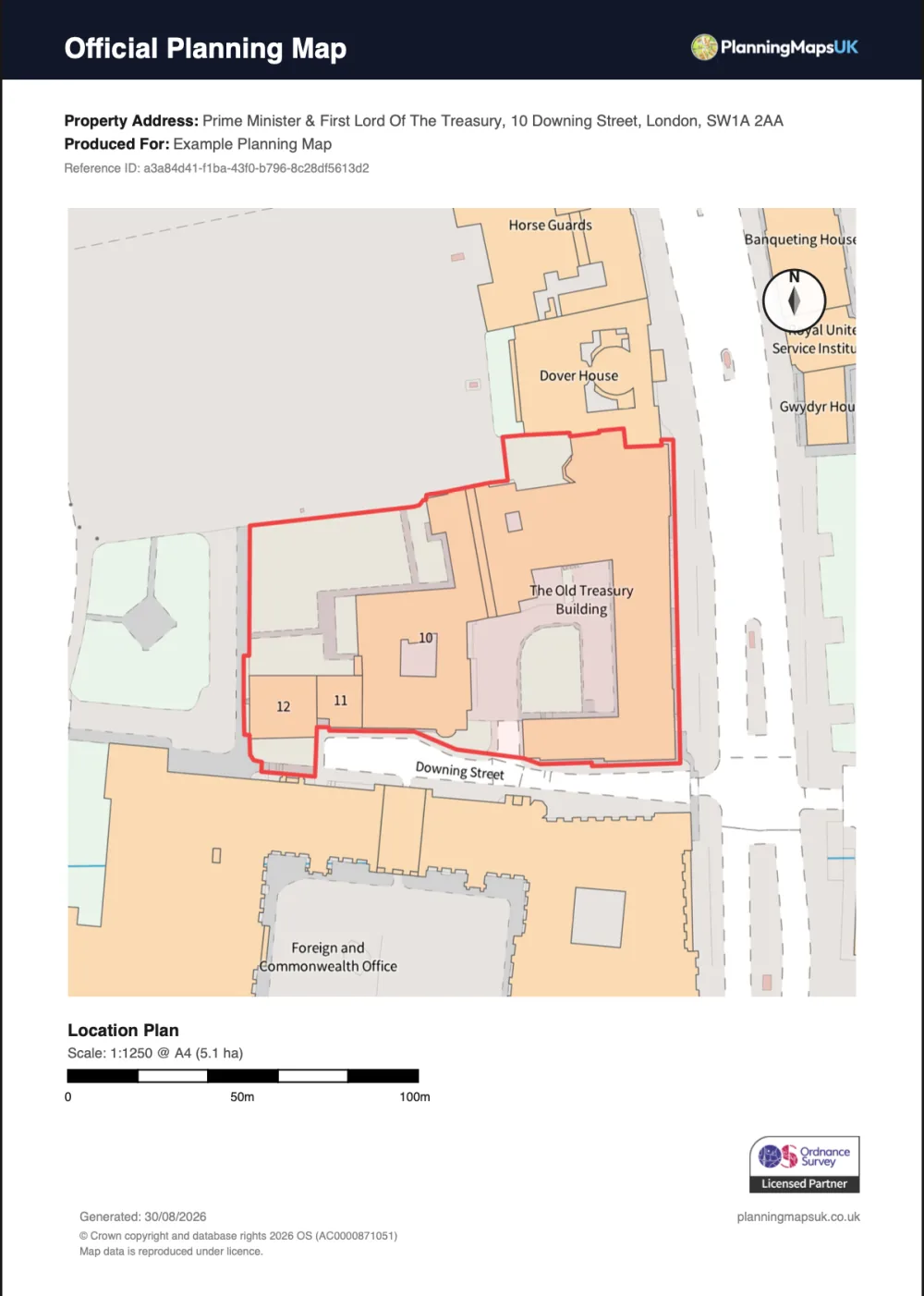
A PlanningMapsUK location plan prepared at 1:1250, with enough surrounding context to identify the site and its access.
Which Scale Should You Select?
The national standard requires:
- 1:1250 Scale: For urban and suburban residential properties. It provides a detailed view of the house, neighbouring gardens, and immediate street layout.
- 1:2500 Scale: For rural properties, farms, and large industrial plots where 1:1250 cannot display the full site and two named roads on a single sheet.
If your property is suburban but sits on an unusually large garden or corner plot, an A3 1:1250 PDF provides double the visible coverage while preserving the preferred 1:1250 scale.

Quick checklist: the right file before you upload.
Unacceptable Map Uploads That Cause Rejection
Validation officers immediately reject the following formats:
- Consumer Map Screenshots: Google Maps, Apple Maps, and Bing Maps are strictly prohibited for statutory planning submissions. They infringe copyright and lack calibrated metric scale bars.
- Block Plans in Place of Location Plans: A 1:500 block plan is essential for showing detail, but it does not satisfy the requirement for wider neighbourhood context.
- Rescaled or Distorted PDFs: Printing a PDF with "Scale to Fit" enabled and re-scanning it distorts the metric ratio, rendering the drawing unmeasurable.
- Hand-drawn Sketches Without Base Mapping: Boundary drawings must be overlaid onto official Ordnance Survey vector lines, not drawn on blank paper.
- Estate Agent Sales Particulars: Floorplans and leasehold boundary sketches extracted from Rightmove or Zoopla sales brochures lack metric scale bars, Ordnance Survey partner licence credentials, and True North orientation.
- Historical Ordnance Survey Maps: Submitting an out-of-date historical map from 1950 or 1980 will be rejected because it fails to document modern boundary developments and recently constructed neighbouring structures.
5 Practical Scenarios and Required Plans
1. Single-Storey Rear Extension
- Location Plan (1:1250): Shows the house in relation to the street and access.
- Block Plan (1:500): Shows the extension footprint and clearances to side/rear fences.
2. Loft Conversion with Rear Dormer
- Location Plan (1:1250): Identifies the property address.
- Block Plan (1:500): Confirms roof overhangs and relationship to neighbouring properties.
3. New Dropped Kerb & Driveway
- Location Plan (1:1250): Crucial that the red line extends fully across the footway/verge to touch the public carriageway.
- Block Plan (1:500 or 1:200): Displays visibility splays, dropped kerb width, and parking layout.
4. Rural Barn Conversion
- Location Plan (1:2500): Captures the long private access lane connecting to the classified public road.
- Block Plan (1:500): Details parking spaces, turning heads, and drainage runs.
5. Architect-Designed New Build
- Location & Block Plan PDF: For standard portal submission.
- DWG / DXF CAD Mapping: Required by the architectural technologist to draft building elevations and structural models.
Frequently Asked Questions
Is a planning portal location plan the same as a site location plan?
Yes. In UK planning terminology, a "planning portal location plan" refers to the formal statutory site location plan uploaded to the Planning Portal alongside your application forms.
What scale should a planning portal location plan be?
National validation standards require 1:1250 for urban and suburban residential sites on A4 or A3 paper, and 1:2500 for larger rural properties, agricultural holdings, or long access tracks.
Can I upload a screenshot from Google Maps to the Planning Portal?
No. Google Maps, Bing Maps, and consumer street maps are unlicensed for statutory planning submissions, lack metric scale bars, and will lead to immediate application invalidation.
Why do councils reject location plans uploaded to the portal?
The most frequent rejection causes are omitting the access driveway leading to the public highway, missing the True North point or graphic scale bar, using an incorrect scale, or uploading an unlicensed map screenshot.
Do I need both a location plan and a block plan on the Planning Portal?
Yes. Any project involving physical building work requires a 1:1250 location plan to show surrounding geographic context, and a 1:500 or 1:200 block plan to show the immediate building footprint, boundaries, and clearances.
What is the best way to avoid upload errors on the portal?
Generate an untrimmed, high-resolution vector PDF using licensed Ordnance Survey mapping, verify that the red line reaches the adopted road, and upload the file under the specific "Location Plan" document category.
Summary
When uploading your location plan to the Planning Portal:
- Ensure the map uses licensed Ordnance Survey MasterMap data with valid Crown copyright.
- Select 1:1250 scale for suburban plots or 1:2500 for rural properties.
- Extend your red-line boundary down the driveway until it meets the public road.
- Never crop out the True North arrow or graphic scale bar.
Order your council-compliant planning portal location plan on PlanningMapsUK today with instant PDF download.