
Consistency for planning officers
OS planning maps use a recognised mapping base so councils can quickly interpret site context and boundary placement.
 Ordnance Survey Licensed Partner
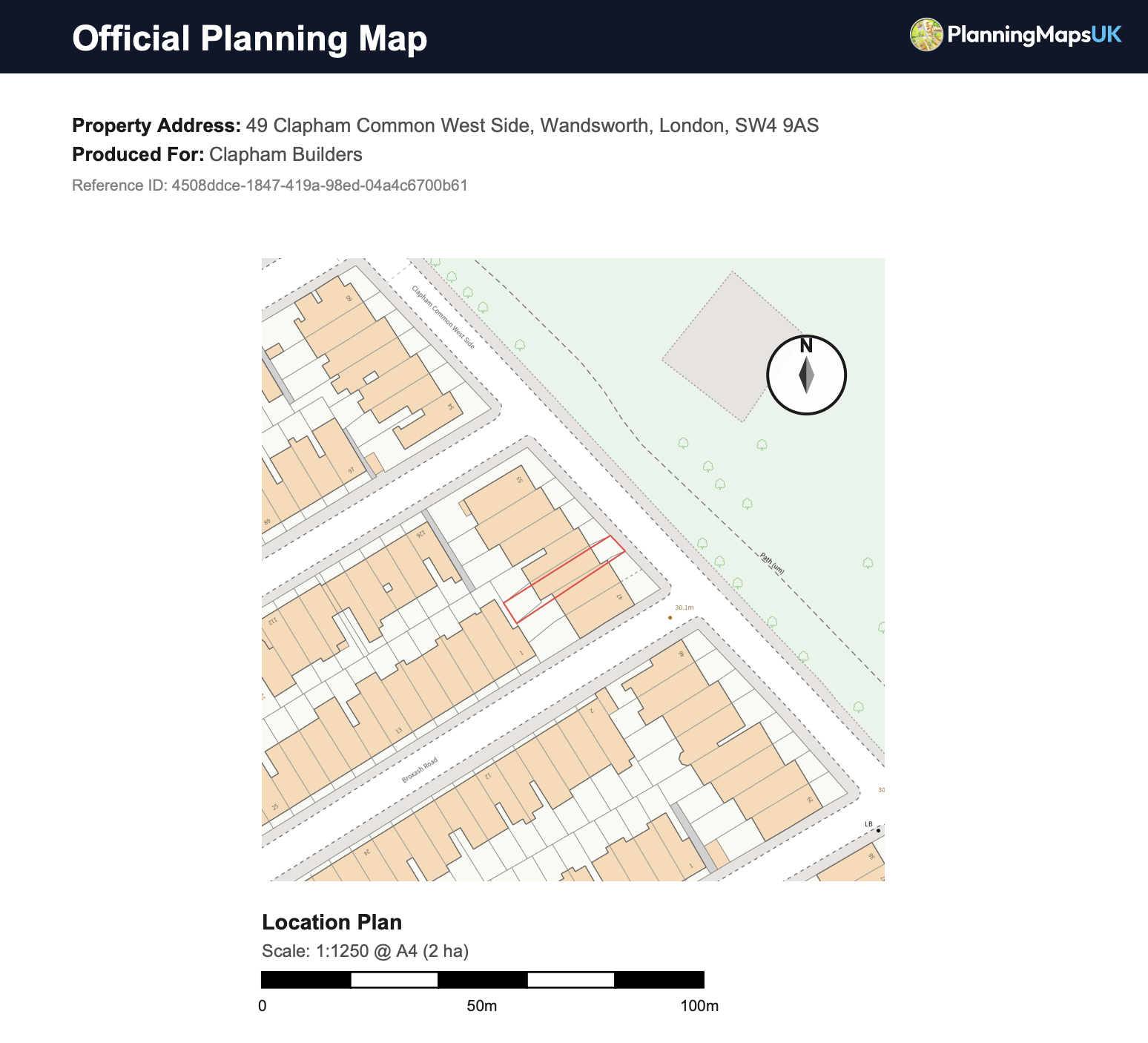
 Buy OS maps for planning applications, including site location plans, block plans and site plans. Mark red and blue boundaries on licensed Ordnance Survey mapping and download a council-ready PDF or CAD file in minutes.
Primary use
Planning applications
Typical scales
1:1250 and 1:500
Delivery
Instant PDF and CAD
Fast Submission Prep
Before you order
Check our OS partner profileRead our map corrections promise
 Open a finished location-plan example image ↗
OS Planning Maps Explained
OS planning maps provide a consistent base for planning officers to assess location, context, access, and site boundaries. A clear and accurate map pack reduces avoidable validation issues at submission stage.
Consistency for planning officers
OS planning maps use a recognised mapping base so councils can quickly interpret site context and boundary placement.
Clear site identification
A properly marked red boundary line helps validation teams confirm the exact land included in your application.
Suitable scales for review
Using the correct scale at each stage helps avoid rework and keeps your planning application documentation coherent.
Site And Location Plans
Many applications require both a broader location view and a more detailed site view. Using both map types helps planning teams understand where the proposal sits and how it relates to nearby plots.
Site Location Plan
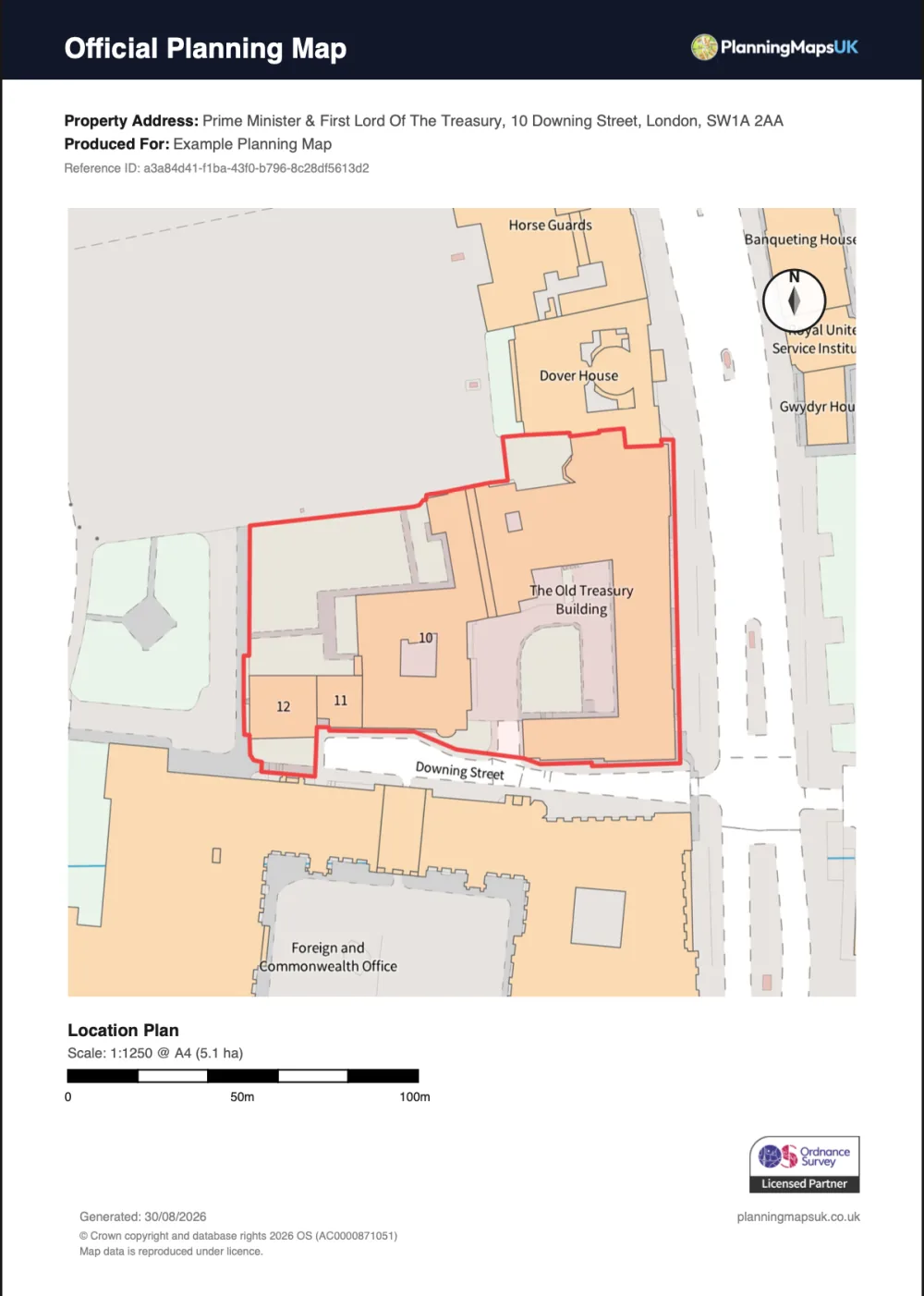
Usually supplied at 1:1250, showing the site in relation to surrounding roads, neighbouring properties, and local context.
Site Plan / Block Plan
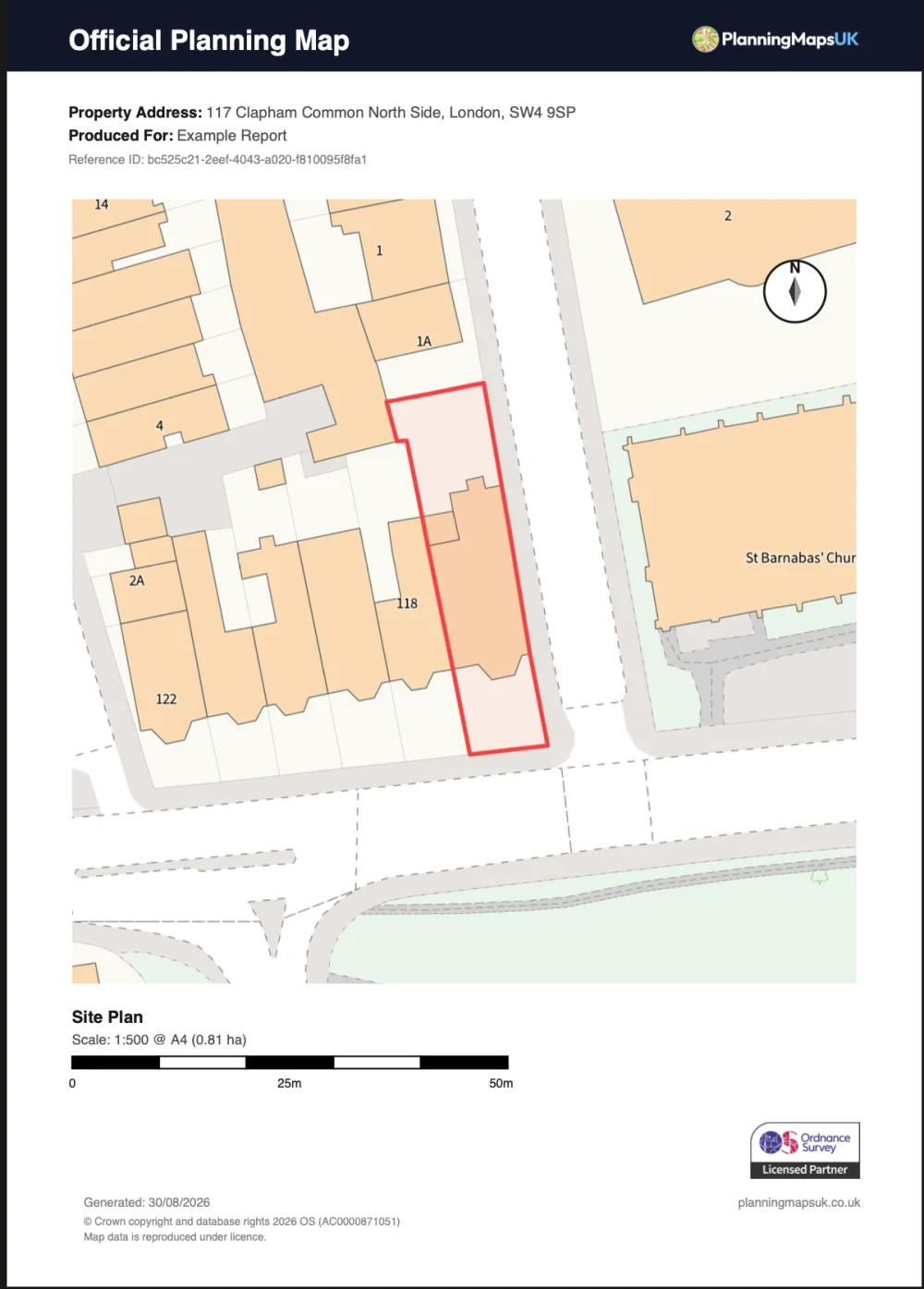
Usually supplied at 1:500, showing building footprints, nearby structures, access points, and the land directly involved in the application.
OS Planning Map Examples
Compare the wider 1:1250 location plan used to identify the application site with the detailed 1:500 site or block plan used to show the property and its immediate context.
Planning Permission Context
When councils assess planning permission, they need a map foundation that is easy to interpret and consistent across applications. OS planning maps help provide that consistency by combining clear site context, accurate base mapping, and recognised planning scales. This gives validation officers, case officers, and consultees a common visual reference from the start of the process.
OS planning maps are useful because they remove ambiguity at the point where councils first check an application. If a planning officer can instantly identify the application site, neighbouring land, and road frontage, they can move faster through validation and consultation stages. That clarity is particularly valuable where multiple title parcels, shared access points, or mixed residential and commercial plots sit close together.
Practical benefit: Rather than submitting an informal screenshot or low-detail base, you submit a map format commonly expected in planning workflows. This improves how clearly your proposal is presented for review.
Site location plans created from OS planning maps also help demonstrate whether the boundary shown in application forms aligns with the land shown in submitted drawings. Where there is a mismatch, councils often issue a validation query, which can delay registration.
Council Validation Checks
Most planning delays linked to mapping happen during the front-end validation stage. Councils are not trying to overcomplicate this step; they are confirming that your submission can be assessed accurately. The checkpoints below are where good OS planning maps usually make the biggest difference.
Validation officers first confirm that the application land can be located without interpretation risk. OS planning maps support this by presenting recognisable local context and reducing the need for follow-up clarification before registration can proceed.
Councils check whether the marked boundary appears to include all land needed to deliver the proposal. Missing access strips, detached parcels, or frontage sections are common causes of validation queries that delay the application start date.
A site location plan and site plan should each serve a clear purpose. Councils look for scale choices that reflect wider context and local detail appropriately, so officers can review the proposal without relying on assumptions.
If map edges, labels, or boundaries are hard to read, councils may request replacement files. Clean OS planning maps with strong contrast and clear output settings help validation teams assess submissions efficiently.
Planning teams compare map documents against application forms and design drawings. Where the map context contradicts written site descriptions, validation pauses while applicants provide corrected information and revised files.
After validation, documents may be reviewed by internal officers, external consultees, and the public portal. Clear site location plans and site plans make that wider review process easier and reduce avoidable interpretation issues.
Application Types
Different projects place different demands on your map pack. Small domestic works still need clear site definition, while larger or mixed-use proposals often need broader context and more careful boundary description.
For many extension applications, OS planning maps are used to provide both strategic and local context. A site location plan shows where the property sits in its immediate area, while a site plan helps officers interpret boundaries, access, and proximity to neighbouring plots. This combined approach gives councils a clear baseline before they move on to elevations, floor plans, and design details.
Loft projects often appear straightforward, but councils still expect map clarity at submission stage. Site location plans can help identify the correct host property in terrace or semi-detached settings, while site plans provide context around access and plot relationship. Using OS planning maps for this foundation reduces the risk of delays caused by unclear boundary interpretation in denser residential streets.
Where an existing building is replaced, map quality becomes more important because officers need to understand both existing context and proposed development position. A robust OS planning map pack helps frame the site clearly before planning teams examine design, scale, massing, and policy alignment. It also supports clearer communication with consultees reviewing the overall planning narrative.
Change-of-use applications benefit from clear mapping because review often includes access, servicing, neighbouring impact, and how the site relates to surrounding uses. Site location plans generated from OS planning maps establish this context quickly. Site plans then help officers assess the immediate land arrangement around entrances, shared areas, and operational boundaries connected to the proposed use.
Commercial proposals can involve busy frontages, shared rights of way, and complex street context. Councils typically require map documents that are clear enough to support internal planning review and consultation responses. OS planning maps paired with a clear site location plan and site plan help reduce ambiguity when multiple adjacent businesses and mixed ownership parcels sit within a compact urban block.
Larger planning applications often involve phased delivery or land split across several parcels. In these cases, map structure is critical. OS planning maps can help present site extent and context coherently, while detailed site plans clarify operational areas and development zones. This can improve how planning officers and consultees interpret the scope of works across a more complex boundary arrangement.
Avoid Validation Delays
This usually happens when access strips, parking areas, or shared driveway segments are accidentally excluded. Before you submit, compare your red line with the land your proposal actually depends on.
Applicants sometimes upload a map at one scale while drawings or forms reference another context. Using a consistent workflow helps reduce these technical mismatches.
If linework, labels, or boundary edges are difficult to read, the application can stall at validation. Keep your outputs clean, use high-legibility map files, and check readability at the final submission format.
Risk Checklist
Boundary stops short of required land
Double-check that the red line includes every part of the site needed to deliver the proposal, including access routes and land used for turning, parking, or servicing.
Context is too tight to understand location
Ensure your site location plan provides enough surrounding reference points so officers can quickly identify the plot and its relationship to nearby roads and properties.
Site plan lacks practical local detail
Include sufficient nearby detail around the proposal area so planning teams can understand how the development sits within the immediate site environment.
Outputs are hard to read after export
Review your final files before submission and confirm linework, labels, and boundaries remain clear in the exact digital format you plan to upload to the portal.
Map information conflicts with forms
Cross-check site descriptions, address details, and boundary statements against your OS planning maps so the planning pack reads as one coherent submission.
Submission Workflow
Keep the process simple by moving from address search to boundary setup, then selecting the output scale and format.
Search the project address and confirm the correct parcel before drawing boundaries.
Mark the red line boundary so the submission reflects exactly what is being applied for.
Select site location plan and site plan outputs at planning-friendly scales for your pack.
Export files and add them to your planning application documents for portal upload.
Validation Checklist
Q&A Section
Practical answers for homeowners, architects, and planning agents preparing applications.
Planning Tool
Decide whether your project needs a site location plan, block plan, or the full planning-map pack before you order.
Scale Tool
Check whether 1:1250, 1:2500, or 1:500 is the right scale mix for your site before buying OS planning maps.
OS planning maps are used to support planning applications by showing the site location and boundary context on a recognised map base.
Many projects require both. The site location plan shows wider context, while the site plan shows detail around the land directly affected by the proposal.
A site location plan is often prepared at 1:1250, and a site plan is often prepared at 1:500. Larger or rural sites may need wider coverage scales.
Yes, when boundaries, scale, and map clarity are correct, applications are generally easier for validation teams to process at first review.
No. Homeowners, planning agents, and consultants all use OS planning maps for applications ranging from extensions to larger site schemes.
Yes. You can generate maps online, choose suitable outputs, and download planning-ready files once your order is complete.
Planning Advice
Related Guides
Need to buy maps for planning permission? Compare site location plans, block plans, CAD maps, and map packs so you order the right Ordnance Survey file first time.
Read guideWhy do UK councils require Ordnance Survey MasterMap data? Understand what OS MasterMap is, why Google Maps fails validation, and how licensing works.
Read guideDon't let a simple mapping error hold up your planning application. Use our 10-point checklist to make sure your Site Location Plan and Block Plan pass validation.
Read guideYou May Also Need
Buy a location plan for a planning application on licensed Ordnance Survey mapping at 1:1250 or 1:2500.
Buy site location planBuy a site plan for a planning application, with an OS-licensed red-line boundary at 1:200, 1:500, 1:1250 or 1:2500.
Buy a site planBuy a block plan for a planning application, showing buildings, access, boundaries and the proposal at 1:500 or 1:200.
Buy block planCreate site location plans and site plans with one workflow, then download files immediately for your planning application.